
For realtors, property managers and landlords across Canada
Every rental file, complete, without the chasing.
One link gives your renter a checklist, a rental application and a safe place to upload from their phone. You are told the moment anything lands, the package goes to the landlord in one click, and the Ontario lease is filled and signed in the same place. It is simple, and your evenings come back.
- Free for two months, no card needed
- Ready in ten minutes
- Stored in Canada, never sold
- English and French
Also an app, for you and your tenants


Needs your attention
2 documents to review
1 renewal in 30 days
Pipeline
12
active tenants
3
new this month
68%
documents complete
Stalest tenants
Plan usage
clients
storage
Welcome back, Alex
3 of 12 documents in. Next: Pay stub 1.
Primary applicant
- Pay stub received
- Package opened by the listing agent
- Lease signed by everyone
What changes the first week
1
link to send, instead of nine follow ups
0
documents sitting in a chat app
10
minutes to set up, from sign up to the first renter
14
pages of the Ontario lease, filled for you
The part nobody warned you about
Every deal stalls in the same place
Not the showing. Not the offer. The four days spent asking four people for the same six documents. It sounds like your week, because it is most people’s week.
“I have asked three times for the same pay stub.”
Foyer knows exactly what is missing and asks for you, by email and text, so you never send that message again.
“Whose ID is this, the applicant or the roommate?”
Every co-applicant has a link and a checklist of their own. Nothing gets mixed up, and you see all of them side by side.
“It is 11 pm and I am renaming attachments.”
Files arrive named, sorted by person, and a phone photo becomes a clean PDF on the way in.
“They sent their passport over WhatsApp. Again.”
Uploads are encrypted and stored in Canada, in a portal built for it, with a log of every open that the renter can read too.
Who it is for
One Foyer, three sides of the same deal
Whoever you are in the rental, Foyer gives you the side that fits, and the other sides see exactly what they should and nothing more.
Show the unit, send the link, and watch the file fill in
Your renter gets a checklist, the rental application and a letter to the landlord, all on their phone. When it is complete, one link carries the whole package to the listing side, with the recipient’s name on every page.
- A link for every co-applicant, with their own checklist
- The day’s showings on their phone, with directions
- The package to the listing agent in one click, opened on the record
- Your brand on the portal they use
How it works
Send one link. That is the whole job.
Your renter does the rest, and you watch it fill in.
- 1
Share your link
A personal link for business cards, your email signature, a listing or a text. The renter lands on your portal, with your name on it, and chooses a password once.
- 2
They upload
A clear checklist says what is needed: ID, pay stubs, credit report, references. Every co-applicant gets their own link and list, and phone photos become clean PDFs.
- 3
You are told, then you send
An email and a text the moment anything lands. Approve it or ask for a better copy in one click. When the file is complete, one link carries the package to the landlord, and when the offer is accepted, the lease is filled and signed in the same place.

Picture the key day with every paper already in place.
The deposit receipt, the insurance, the signed lease: each on its row, each on the record, long before anyone stands at the door.
Built for the way renting works in Canada
Everything the deal needs, in one place
From the first document to the signed lease and the key day, each step has its own screen, and each screen talks to the next.
The checklist and your review
Every document, named and sorted the moment it arrives
The checklist is built for your province, with a section for each applicant and one for the accepted offer. A row goes from Required to Pending Review to Completed, and a note on a row reaches the renter by email and text.
- Up to ten files at once, from a phone or a folder
- A photo becomes a PDF named after the document
- Add any row from the document library
The package
One link carries the whole file to the landlord
The letter opens first, then the application, then every completed document. The recipient’s name is on every page, the link lives fourteen days, and you see the moment it is opened. Five packages follow the deal: application, deposit, insurance and utilities, move in, and additional documents.
- A window shows every file before it goes; remove any
- Send later, at the hour the offer goes in
- The move in photos with the question of when they will be fixed
Send the package to the leasing agent
Application package
Ready: 2
Deposit
Ready: 0
Insurance and utilities
Ready: 0
Problems found at move in
Ready: 3
Additional documents
Ready: 0
Unit
Recipient name
Recipient email
The Listing Desk
Applicants to your unit, side by side
Every package sent to your address lands on the unit it is for. With two applicants or more, Compare puts them in columns: income against the rent, employment, time at the address, references and documents complete, with the figures an AI model read from the pay stubs and the credit report, marked for you to check. Share the page with the owner by an expiring link.
- A free desk for landlords, property managers and listing agents
- Weights you set, a score that follows them
- Nothing is decided in Foyer: the page prepares, you decide
Applicants compared
212 Lakeshore Rd W, Unit 4 · Rent $2,450Applicant A
Applicant B
Income against the rent
3.4x Checked
2.6x Read by AI
Credit score
742 Checked
690 Read by AI
Years at address
4
1
References
2 / 2
1 / 2
Documents complete
12 / 12
9 / 12
Score
88
71
The Ontario lease
Ontario’s standard lease, filled from the file and signed on the phone
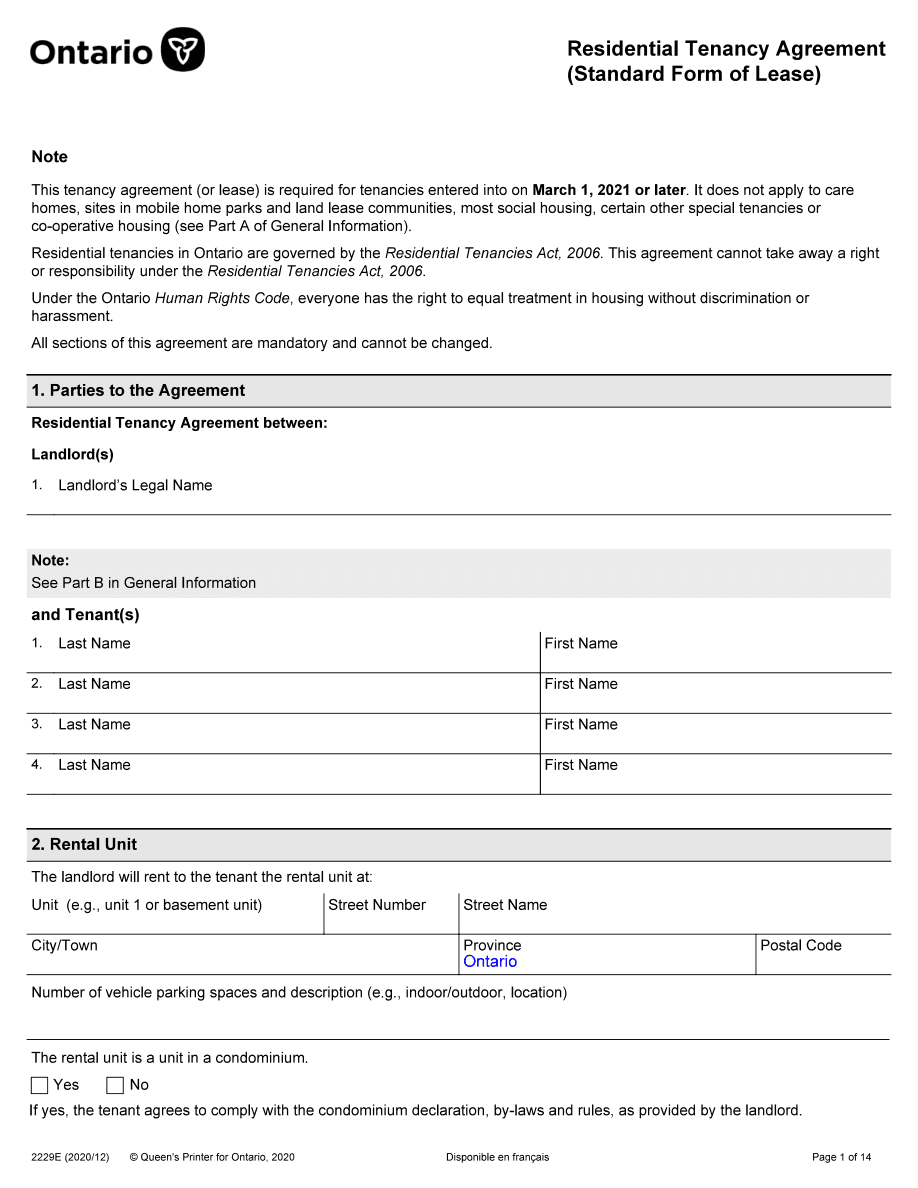
Form 2229E, every page untouched. The unit, the rent and the start date come from the listing, the tenants from the application, the landlord from your account. Add the terms you want from a short list, and Foyer warns when a term is one the law makes void. Each tenant signs by typing their name, then the landlord side, and the signed form lands on everyone’s file.
- Included with Pro, Team and Foyer Go
- The time and address of every signature on record
- British Columbia and Alberta follow
The day of showings
The route on their phone, and every place they saw
Forward the day’s schedule from BrokerBay or ShowingTime, or paste a Google Maps route, and the renter gets the stops in order with Waze or Google Maps for each. On the way round they keep each place with photos, the asking price and a note they can dictate while it is fresh.
- The email and the text say how many showings, never the addresses
- A place added on the board joins the route of its day
- Seven places, seven photos each
Properties seen
212 Lakeshore Rd W, Unit 4
$2,450 a month
Bright kitchen, parking included. Second floor.
18 Elm St, Apt 302
$2,300 + utilities
Messages, texts and the letter
Every word about the file, kept beside the file
One conversation per professional, like a chat app. Every message reaches the other side by email and by text, a note on a document is a link to that document, and the renter’s seven short answers become a one page letter to the landlord, in their words, with their photo.
- Dictate a message or an answer; nothing is recorded
- Schedule a message for the hour that suits
- Reminders at three, two and one month before a renewal
Messages · Jay Brown, your realtor
Hi Alex, your pay stub came through and it is approved. One more and the file is complete.
Thank you. Sending it tonight from my phone.
Perfect. The landlord sees it the moment it is in.
Do the math
What the chasing is costing you
Drag the sliders to your month. Picture the same month with the chasing gone.
3 applications
$75 per hour
Based on roughly six follow ups per application at seven minutes each, plus about 25 minutes re-filing documents that arrive by text or email.
3.4 hours
given back every month
$255
of your time, back every month
18
follow up messages you never send
41 hours
of working time, back in your year
The question you will be asked
Your tenants’ information is not for sale. Not to us, not to anyone.
Agents ask before they sign up, and their renters ask them. Here is the answer, and every word of it is something you can check.
Stored in Canada
Every document, application and message lives on Canadian servers in Montréal, encrypted, and is not stored anywhere else.
We do not see your tenants’ names
Foyer’s administrator sees how many tenants your account has, and nothing more: not a name, not a document, not a message. No other brokerage sees them either: the database walls each account off.
Never sold, never marketed
Tenant information belongs to the subscriber who collected it. It is written into the terms you sign, not only here.
Every open is on the record
You and your renter both see who opened which document, when, including any access by Foyer itself.
Simple pricing
Start free. Upgrade when it pays for itself.
Every monthly plan starts with two free months. No credit card, no contract, in Canadian dollars.
Starter
1 User · Up to 27 Tenants per annum
$29
CAD per month
- AI Checklist Builder
- AI PDF Scanner
- Template Document Checklists
- Rental Application Form
- A link for every co-applicant
- Accepted Offer
- Communication Hub
- Email Notifications
- Most popular
Pro
1 User · Up to 51 Tenants per annum
$47
CAD per month
- Everything in Starter
- White Label Branding
- Cloud Storage Sync
- Sweetheart Letter
- Showing Route by Email
- Properties Seen, with Dictated Notes
- Google Review Requests
- Ontario Lease, Filled and Signed in Foyer
Team
Up to 5 Users · Up to 150 Tenants per annum
$197
CAD per month
- Everything in Pro
- Team Management
- Co-broker Shared Tenants
- Priority Support
Custom
Two people, or twenty. Priced around what you actually run.
Let’s talk
Pricing built around your business
- Everything in Team
- Two or three people, priced between Pro and Team
- Volume pricing across teams
- White glove onboarding
Or pay per renter with Foyer Go
No monthly fee. Each renter is charged once, when you send their first package. The lease is included.
Go Pro
$19 CAD per renter
Everything in Pro, with no cap on tenants: your brand, the letter, the showing route, the lease and more.
Start with Foyer GoThe Listing Desk
FreeFor landlords, property managers and listing agents who receive packages. Every package sent to your email lands on your desk, on its unit, with the comparison. It sends nothing; pick a plan the day you have renters of your own.
Open a free deskQuestions
The things people ask first
They choose a password once from your link, and that is it. No app to install, no training. Most renters finish their first upload in a few minutes on their phone. A renter who already uses Foyer with another professional joins you with the password they have, and their documents come with them.
That is what most people do. Foyer turns a phone photo into a clean PDF named after the document you asked for, so what reaches the landlord looks professional.
Yes, in Ontario, on the government’s own Standard Form of Lease. Foyer fills it from the listing, the application and your account; each tenant signs on their phone by typing their name, then the landlord side signs, and the signed form lands on everyone’s file with the time and address of each signature on record. Foyer gives no legal advice: for a question about a term, see a lawyer or the Landlord and Tenant Board.
Yes. Choose Landlord or Property manager at sign up and invite your tenants the same way a realtor does. Packages other agents send you land on your Listing Desk, which is free to receive and compare on.
Documents are encrypted, stored in Canada, scoped to your business, and opened only through links that expire. Every open is written to a log the renter can read too. Foyer does not see your tenants’ names, and its own administrator cannot open a file unless you turn on support access for it, for a few days.
Under ten minutes. Create your account, add your logo, copy your link. Your next applicant can use it the same day. The two free months start then, with no card on file.
The whole of Foyer works in English and French: the portal, your own screens, the emails and the Support Centre. Each person reads it in their own language.

They are already looking at the next place. Your file is done.
A complete package before anyone else replies is the difference between an evening of chasing and an evening at home.
Give your evenings back.
Start the two free months and send your link to the next applicant. Picture the first file arriving complete while you are at dinner.
No card. No sales pitch. A real conversation, when you want one.